
Spam calls are more than just annoying—they can be scams that cost you time, money, and peace of mind. Learning how to stop spam calls is essential in today’s digital world. In this guide, we’ll explore practical tips, tools, and strategies to block unwanted callers and protect your privacy.
Why Spam Calls Are a Problem
Unsolicited calls can be frustrating, intrusive, and sometimes dangerous. Scammers often use these calls to steal personal information, while telemarketers may bombard you with repeated offers. Beyond annoyance, spam calls can:
- Disrupt work or personal time
- Lead to identity theft if answered carelessly
- Cause stress or anxiety due to frequent interruptions
Understanding the risks makes it clear why knowing how to prevent them is crucial.
Top Methods to Stop Spam Calls
Here are proven ways to minimize or eliminate spam calls:
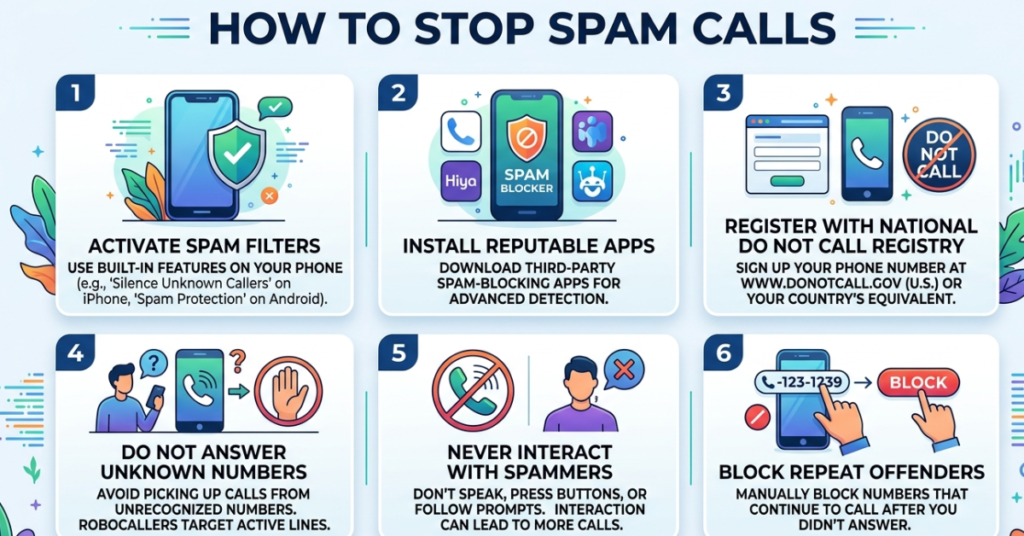
1. Use Built-in Phone Features
Most smartphones have tools to block unknown numbers:
- iPhone: Go to Settings → Phone → Silence Unknown Callers.
- Android: Navigate to Phone app → Settings → Blocked numbers.
This prevents calls from unrecognized numbers from reaching you.
2. Register on the National Do Not Call List
In many countries, a government-run Do Not Call registry allows you to opt out of telemarketing calls. It may not stop scammers, but it can reduce legitimate marketing calls significantly.
3. Install Call-Blocking Apps
There are apps specifically designed to block spam calls automatically:
- Truecaller – Identifies unknown numbers and spam callers
- Hiya – Provides caller ID and automatic blocking
- RoboKiller – Uses smart algorithms to stop spam calls
These apps are often customizable, letting you filter calls based on preferences.
4. Avoid Answering Unknown Numbers
If you don’t recognize a number, let it go to voicemail. Many spam calls stop if they don’t get a response.
5. Don’t Share Your Number Publicly
Avoid posting your number online or entering it on suspicious websites. Scammers often collect numbers from public sources.
6. Report Spam Calls
Reporting spam numbers to authorities or your carrier helps reduce future calls:
- In the U.S., use the FTC Complaint Assistant.
- Contact your mobile carrier for blocking services or reporting features.
Extra Tips for Peace of Mind
- Enable call screening features if your phone supports it
- Use custom ringtones for important contacts to ignore unknown numbers
- Educate family members about spam and phishing calls
FAQs About Stopping Spam Calls
Q1: Will blocking unknown numbers stop all spam calls?
A: Not entirely. It stops most automated calls, but some scammers may spoof known numbers.
Q2: Are call-blocking apps safe?
A: Yes, reputable apps like Truecaller or Hiya are secure, but always download from official app stores.
Q3: How long does it take for the Do Not Call registry to work?
A: Typically, it takes up to 31 days for telemarketing calls to decrease after registration.
Q4: Can spam calls lead to scams?
A: Yes. Some calls attempt to steal money or personal information, so never share sensitive data over the phone.
Q5: Do carriers provide spam call protection?
A: Most major carriers offer free or paid services to block or filter unwanted calls.
Conclusion
Knowing how to stop spam calls empowers you to take control of your phone and protect your personal information. By combining built-in features, call-blocking apps, and smart habits, you can dramatically reduce interruptions and stay safe. Start today, explore the tools mentioned, and reclaim your peace of mind.