
Buying a gaming monitor can feel overwhelming. With terms like refresh rate, response time, panel type, and adaptive sync thrown around, it’s easy to get lost. If you’re wondering how to choose a gaming monitor, you’re not alone — it’s one of the most searched questions among PC and console gamers today.
The right gaming monitor can improve reaction time, make visuals smoother, and elevate your entire gaming setup. In this guide, you’ll learn exactly how to choose a gaming monitor based on performance, budget, and gaming style. Let’s break it down step by step.
Why Choosing the Right Gaming Monitor Matters
Your monitor directly affects:
- Visual clarity
- Motion smoothness
- Input lag
- Competitive performance
- Overall gaming immersion
Even a powerful GPU can’t shine if paired with a poor display. That’s why understanding how to choose a gaming monitor is essential before spending your money.
Key Factors When Choosing a Gaming Monitor
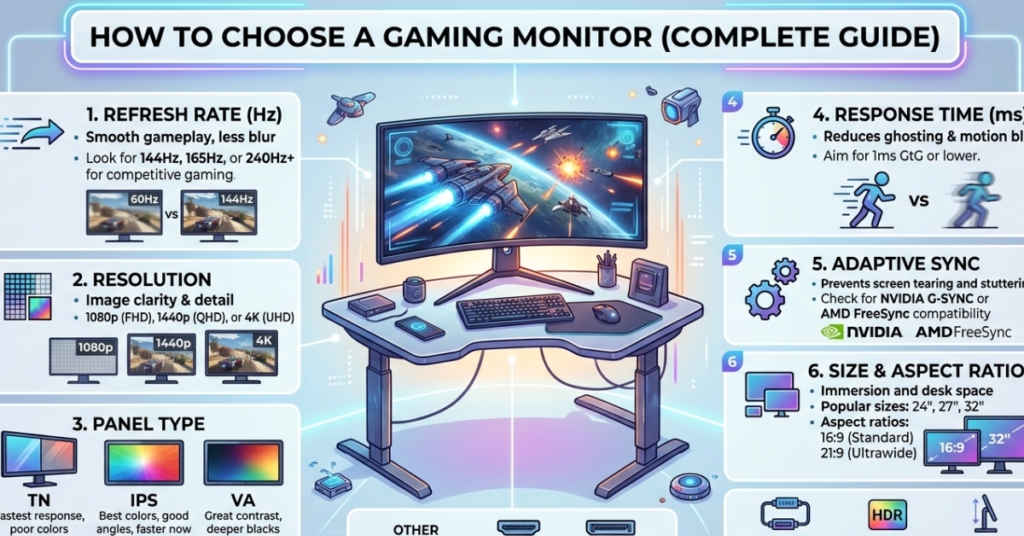
1. Refresh Rate (Hz) – Smoothness Matters
Refresh rate determines how many times your screen updates per second.
Common options:
- 60Hz – Basic gaming
- 75Hz – Slight improvement
- 120Hz / 144Hz – Ideal for most gamers
- 165Hz / 240Hz – Competitive gaming
- 360Hz – Professional esports
Tip:
If you play FPS games like Valorant, CS2, or Warzone, go for 144Hz or higher.
2. Response Time – Reduce Motion Blur
Response time measures how fast pixels change color.
Look for:
- 1ms (best for competitive gaming)
- 3ms–5ms (good for casual gaming)
Lower response time = less ghosting and blur.
3. Resolution – Clarity vs Performance
Resolution affects sharpness but also impacts performance.
Popular gaming monitor resolutions:
- 1080p (Full HD) – Best for high FPS
- 1440p (QHD) – Best balance
- 4K (UHD) – Stunning visuals but needs powerful GPU
Quick rule:
- Competitive gamers → 1080p / 1440p
- Story-driven gamers → 1440p / 4K
4. Panel Types – IPS vs VA vs TN
Each panel type has strengths:
IPS Panel
- Best colors
- Wide viewing angles
- Slightly slower response (but modern IPS is fast)
VA Panel
- High contrast
- Good for immersive gaming
- Moderate response time
TN Panel
- Fastest response time
- Cheapest
- Poor colors
Best overall choice: IPS for most gamers
5. Screen Size – Finding the Sweet Spot
Common sizes:
- 24-inch → Competitive gaming
- 27-inch → Most popular
- 32-inch → Immersive experience
- Ultrawide (34″+) → Simulation & RPG
For most setups, 27-inch 1440p is the sweet spot.
6. Adaptive Sync (G-Sync / FreeSync)
Adaptive sync eliminates screen tearing.
- NVIDIA GPUs → G-Sync
- AMD GPUs → FreeSync
- Many monitors support both
Always try to get a monitor with adaptive sync support.
7. Input Lag – Hidden Performance Factor
Low input lag helps competitive players.
Look for:
- Under 5ms input lag
- Gaming mode settings
Choosing Based on Your Gaming Style
Competitive Gamers
- 1080p resolution
- 240Hz refresh rate
- 24–25 inch
- TN or fast IPS panel
Casual Gamers
- 1440p resolution
- 144Hz refresh rate
- 27 inch IPS
Console Gamers (PS5 / Xbox Series X)
- 4K resolution
- 120Hz support
- HDMI 2.1
Immersive Single‑Player Gamers
- Ultrawide monitor
- 1440p or 4K
- IPS or VA panel
Budget Guide
Entry-Level ($150–$250)
- 1080p
- 144Hz
- 24-inch
Mid-Range ($250–$500)
- 1440p
- 144Hz–165Hz
- IPS panel
Premium ($500+)
- 4K or Ultrawide
- 240Hz+
- HDR support
Extra Features Worth Considering
- HDR support
- Curved screen
- USB hub
- Height adjustable stand
- Blue light filter
- Built-in speakers (optional)
Quick Checklist – How to Choose a Gaming Monitor
Before buying, ask yourself:
- What games do I play?
- What GPU do I have?
- Do I want higher FPS or better visuals?
- What size fits my desk?
- What’s my budget?
FAQs About How to Choose a Gaming Monitor
What is the best refresh rate for gaming?
144Hz is the sweet spot for most gamers. Competitive players should consider 240Hz.
Is 1440p better than 1080p for gaming?
Yes, 1440p offers sharper visuals while still maintaining good performance.
Should I choose IPS or VA for gaming?
IPS is best for most users due to better colors and balanced performance.
Do I need 4K for gaming?
Only if you have a powerful GPU and prefer visuals over high FPS.
What size gaming monitor is best?
27-inch is the most popular and balanced option.
Is curved monitor good for gaming?
Yes, especially for immersive and ultrawide setups.
Conclusion
Now that you know how to choose a gaming monitor, the decision becomes much easier. Focus on refresh rate, resolution, panel type, and screen size first — then consider extras like HDR and adaptive sync.
For most gamers, a 27-inch 1440p IPS monitor with 144Hz offers the best balance of performance and visuals. But ultimately, the best choice depends on your gaming style and budget.